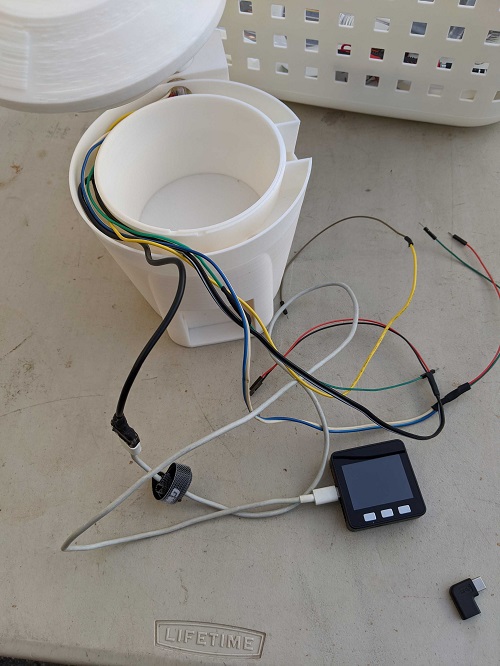
配線の改良、デザインの修正
M5が入る部分が小さかったのか配線が入らずデザインを作り直すことにした。
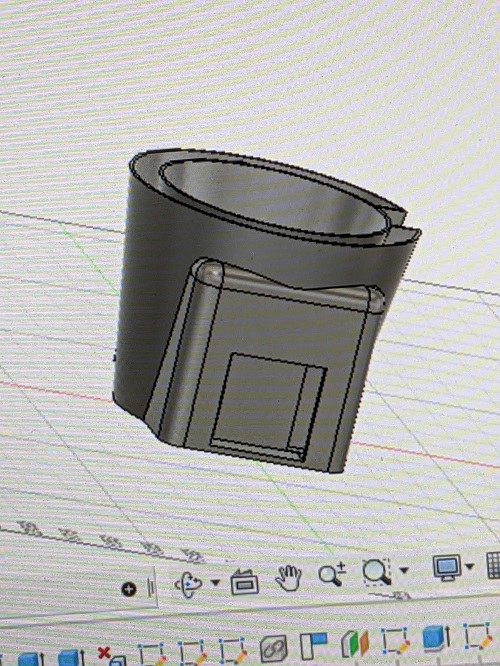
M5の部分を大きくすることにより配線を実現可能にした。
しかしスタイリッシュ感はなくなってしまった。
求める形と実現可能をどちらも実現可能にするのは難しい
プログラムを変更した。Neopixelと水をくみ上げるポンプの別々のプログラムだったものを統一のプログラムにして、動くようにした。
#include <WiFi.h>//moter
#include <HTTPClient.h>//moter
#include <Adafruit_NeoPixel.h>//neo
#include <M5Stack.h>//neo moter
#define PIN 6 //neo
Adafruit_NeoPixel strip = Adafruit_NeoPixel(24,26, NEO_GRB + NEO_KHZ800); //neo
//                          |  |   |     |
//                                           |    |    |        +--clock
//                                           |    |    +---LEDの並び方
//                                           |    +--接続ポート
//                                           +--LEDの数

//使用環境に応じて変更-------------------------------------------------
const char* ssid     = "";//繋げたいネットワーク
const char* password = "";//繋げたいネットワークのパスワード
String host = "/////"
String user_key = ""//自分のユーザーkey
String sub_id = "";//端末の名前など識別できるに文字
//-------------------------------------------------------------------
int moist_Port = 35;
//    2020/10/3道用修正------------------
unsigned long time_cnt;
//-----------------------------------
void setup(){
    Serial.begin(115200);//M5Stackは115200にしないと文字化けする
    M5.begin();
    M5.Power.begin();
    m5.Speaker.write(0);
    pinMode(moist_Port,INPUT);
    pinMode(25,OUTPUT);
    // text print
    M5.Lcd.fillScreen(BLACK);
    M5.Lcd.setCursor(10, 10);
    M5.Lcd.setTextColor(WHITE);
    M5.Lcd.setTextSize(1);
    M5.Lcd.println("Boot Complete");
    WiFi.begin(ssid, password);
    Serial.println("WiFi connecting");
    while ((!(WiFi.status() == WL_CONNECTED))){
      delay(300);
      Serial.print(".");
    }
    Serial.println("");
    Serial.println("WiFi connected");
//    2020/10/3道用修正------------------
    time_cnt=0;
//    ----------------------------------
//    ----------------------------------↓neopixel
  strip.begin();
  strip.show(); // Initialize all pixels to 'off'
  LED_ON();
}
void loop(){
    time_cnt++;//カウントする。0.1秒のdelayを入れたから0.1秒毎に1カウントされる
//    2020/10/3道用修正------------------
    Serial.println(time_cnt);
    if (time_cnt>= 600) {  // 0.1秒のdelayをいれたから前回実行時刻から60秒以上経過していたら
      moist_sensor();       // センサーの読み取りとIoTサーバーへの書き込みを実行するmoist_sensor()を呼び出し
      time_cnt=0;//カウントを0にする
    }
//    ----------------------------------
    M5.update();
      if (M5.BtnB.wasPressed () ){
        digitalWrite(25,HIGH);
        delay(2000);//2秒水やり
        digitalWrite(25,LOW);
      }
      else if (M5.BtnB.wasReleased()) {
        digitalWrite(25,LOW);
    }
    delay(100);
}
//    2020/10/1道用追加------------------
void moist_sensor() {
    int d;
    d =analogRead(35);
    Serial.println (d);
    String svalue = String(d);
    String ret = sendData_to_doyolatIoT(svalue);
    Serial.println(ret);
    M5.Lcd.fillScreen(BLACK);
    M5.Lcd.setCursor(10, 10);
    M5.Lcd.println(d);
}
//    ----------------------------------
String sendData_to_doyolatIoT(String mydata){
    String ret;
    if (WiFi.status() == WL_CONNECTED){
      HTTPClient http;
      http.begin(host);
      http.addHeader("Content-Type", "application/x-www-form-urlencoded");
      //必要に応じて変更-----------------------------------------------------
      //floatデータを送信する場合
      //String params= "user_key="+user_key+"&sub_id="+sub_id+"&float_data="+ mydata;
      //intデータを送信する場合
      String params= "user_key="+user_key+"&sub_id="+sub_id+"&int_data="+ mydata;
      //testデータを送信する場合
      //String params= "user_key="+user_key+"&sub_id="+sub_id+"&text_data="+ mydata;
      //-------------------------------------------------------------------
      int httpCode = http.POST(params);
      if (httpCode > 0) {
        // HTTP レスポンスコードが返ってくる
        Serial.printf("[HTTPS] POST... code: %d\n", httpCode);
        String payload = http.getString();
        ret = payload;
      } else {
        // コネクションエラーになるとマイナスが返る
//        Serial.println("[HTTPS] no connection or no HTTP server.");
        ret = "[HTTPS] no connection or no HTTP server.";
      }
      http.end();
    }else{
      ret="No Wifi";
    }
    return ret;
}

void LED_ON(){
      // -------↓neopixel
  strip.setPixelColor(0,strip.Color(255,0,0));
  strip.setPixelColor(1,strip.Color(255,0,0));
  strip.setPixelColor(2,strip.Color(255,0,0));
  strip.setPixelColor(3,strip.Color(255,0,0));
  strip.setPixelColor(4,strip.Color(0,0,255));
  strip.setPixelColor(5,strip.Color(255,0,0));
  strip.setPixelColor(6,strip.Color(255,0,0));
  strip.setPixelColor(7,strip.Color(255,0,0));
  strip.setPixelColor(8,strip.Color(255,0,0));
  strip.setPixelColor(9,strip.Color(0,0,255));
  strip.setPixelColor(10,strip.Color(255,0,0));
  strip.setPixelColor(11,strip.Color(255,0,0));
  strip.setPixelColor(12,strip.Color(255,0,0));
  strip.setPixelColor(13,strip.Color(255,0,0));
  strip.setPixelColor(14,strip.Color(0,0,255));
  strip.setPixelColor(15,strip.Color(255,0,0));
  strip.setPixelColor(16,strip.Color(255,0,0));
  strip.setPixelColor(17,strip.Color(255,0,0));
  strip.setPixelColor(18,strip.Color(255,0,0));
  strip.setPixelColor(19,strip.Color(0,0,255));
  strip.setPixelColor(20,strip.Color(255,0,0));
  strip.setPixelColor(21,strip.Color(255,0,0));
  strip.setPixelColor(22,strip.Color(255,0,0));
  strip.setPixelColor(23,strip.Color(255,0,0));
  strip.setPixelColor(24,strip.Color(0,0,255));
                    // |      |
                    // |
                    // +--LED番号
  strip.show();
}